Cloud & Infrastructure
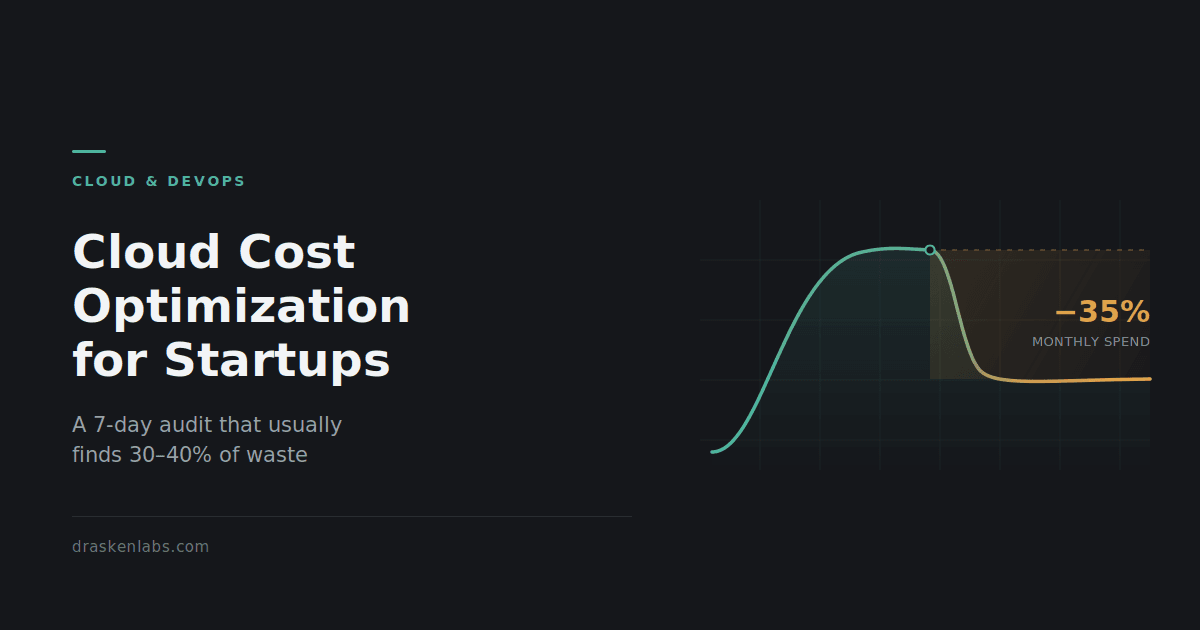
Cloud Cost Optimization for Indian Startups: A 7-Day Audit That Usually Finds 30–40%
Every founder we talk to has the same story about their cloud bill. It was fine, then it wasn’t, and nobody can point at the exact month it stopped being fine. Cloud cost optimization gets treated as a finance problem when the invoice arrives. It’s an engineering problem that started months earlier. The industry number
Every founder we talk to has the same story about their cloud bill. It was fine, then it wasn’t, and nobody can point at the exact month it stopped being fine.
Cloud cost optimization gets treated as a finance problem when the invoice arrives. It’s an engineering problem that started months earlier. The industry number is that companies waste roughly a third of their cloud spend. The industry number is that companies waste roughly a third of their cloud spend. That figure gets repeated so often it has stopped meaning anything, so here it is in rupees instead. A Series A SaaS company running ₹8,00,000 a month on AWS is probably burning ₹2,40,000 to ₹3,20,000 of that on infrastructure nobody uses, nobody monitors, and nobody would miss. Over a year that is close to ₹35,00,000. That is two senior engineers, or eighteen months of runway extension, sitting inside a billing console.
The uncomfortable part is that this is almost never an engineering skill problem. It is a sequencing problem. Infrastructure gets provisioned during a launch crunch, when the only thing that matters is that the thing works. Nobody comes back. The bill compounds quietly, and by the time someone notices, the architecture has grown around the waste and touching it feels risky.
What follows is the audit we actually run at the start of a cloud and DevOps engagement. It is ordered deliberately. Most cost optimization guides start with Reserved Instances and Savings Plans, which is exactly backwards. Commitment discounts are the last step, not the first, and we will get to why.
Day 1: Get visibility before you touch anything
You cannot optimize what you cannot attribute. Before any changes, you need to be able to answer one question: which team, service, or environment is responsible for each line on the bill?
On AWS, enable Cost Explorer if it isn’t already on. Expect a 24-hour delay before data populates on first activation, so do this before anything else. Then enable Cost and Usage Reports (CUR) delivered to S3, and query them with Athena. Cost Explorer is fine for eyeballing trends; CUR is where you find the truth.
On GCP, set up billing export to BigQuery. On Azure, use Cost Management exports.
Then the part everyone skips: tagging. Without cost allocation tags, your bill is one large undifferentiated number. Define a minimal, enforced tag schema, four or five keys at most:
env(prod / staging / dev)service(the application or team that owns it)owner(an actual human or team, not “platform”)cost-center(if finance needs it)
Enforce it in Terraform with default_tags at the provider level, so new resources cannot be created untagged. Retroactive tagging is a slog, but a one-time slog. Untagged resources are where money hides.
Set your baseline here: total spend for the last three months, grouped by service. Take a screenshot. You will want it later when someone asks what the work achieved.
Day 2: Delete the zombies
This is the highest-return, lowest-risk day of the audit, and it usually pays for the whole exercise.
Zombie resources are things that are running, billing, and attached to nothing. Common ones:
- Unattached EBS volumes. Instances get terminated; volumes often survive them. You are paying full price for disks nobody can read.
- Old EBS snapshots. Snapshot on every deploy with no lifecycle policy, and after two years you have thousands.
- Idle load balancers. An ALB with zero healthy targets still bills the hourly charge.
- Unassociated Elastic IPs. Worth flagging specifically: since February 2024, AWS charges for all public IPv4 addresses, not just idle ones, at roughly $0.005 per hour each. That is about ₹300 per address per month. Across a sprawling account with hundreds of addresses, this became a real line item overnight and most teams never adjusted.
- Orphaned NAT Gateways. More on these tomorrow, because they deserve their own conversation.
- Stopped instances with attached storage. The compute is free; the disk is not.
- Abandoned dev environments. Someone spun up a full staging stack for a demo in 2024. It is still there.
Run through Trusted Advisor’s cost optimization checks as a starting point, but do not stop there. Trusted Advisor is conservative and misses a lot.
Nothing on this list should require an architecture discussion. If a resource is genuinely orphaned, delete it. Take a snapshot first if you’re nervous, then set a calendar reminder to delete the snapshot in 30 days.
Day 3: Right-size compute, and question the instance family
Right-sizing has a bad reputation because people do it badly: they look at average CPU, see 12%, and halve the instance. Then something falls over during a traffic spike and the whole exercise gets abandoned.
Do it properly. Look at p95 and p99 utilization over at least 30 days, not averages, and look at memory alongside CPU. Many workloads that look CPU-idle are memory-constrained, and downsizing them is how you cause an incident.
Two changes usually deliver more than raw downsizing:
Move to ARM. On AWS, Graviton instances offer roughly 20% better price-performance than equivalent x86 for most standard workloads. If you are running containerized Node, Python, Go, or JVM services, the migration is often just a multi-architecture image build. GCP has Tau/Axion; Azure has Cobalt. This is one of the few optimizations where you get a discount for doing nothing to your architecture.
Move gp2 volumes to gp3. gp3 is around 20% cheaper per GB and decouples IOPS from volume size, giving you 3,000 baseline IOPS regardless. On gp2, teams routinely over-provision disk size purely to buy IOPS. This is a live migration on most volume types, and it is close to free money.
Day 4: The network bill nobody reads
Data transfer is the single most under-audited line on a cloud bill, because it is invisible in architecture diagrams. Three patterns account for most of it.
NAT Gateway processing charges. A NAT Gateway costs roughly $0.045 per hour to run plus $0.045 per GB processed. That per-GB charge is the problem. If your private-subnet services pull container images, hit S3, or talk to DynamoDB, every byte goes through NAT and gets billed. We have seen NAT processing exceed the compute cost of the services behind it.
The fix is usually VPC Gateway Endpoints for S3 and DynamoDB, which cost nothing and route that traffic off the NAT path entirely. This is often a single-digit-hour change that removes a five-figure annual cost. Interface Endpoints (PrivateLink) for other services do have an hourly charge, so those need a genuine per-service calculation, not a blanket rollout.
Cross-AZ traffic. AWS bills roughly $0.01 per GB in each direction for traffic between availability zones, so ₹ per GB round-trip. Chatty microservices spread randomly across three AZs, or an application layer talking to a database replica in another AZ, generate this constantly. Topology-aware routing in Kubernetes and AZ-aware service placement fix most of it. Note the tension: you are trading some cost against availability, so this is an architecture decision, not a cleanup task.
Egress to the internet. Serve static assets and media through a CDN rather than directly from origin. Cloudflare and CloudFront both change the economics substantially at volume.
Day 5: Storage tiers and the CloudWatch Logs surprise
Storage feels cheap per GB, which is exactly why it grows unchecked.
Object storage lifecycle policies. S3 Standard to Infrequent Access to Glacier, based on actual access patterns. S3 Intelligent-Tiering handles this automatically and is a good default for large objects, but read the fine print: it charges a small monitoring fee per object per month. For a bucket with tens of millions of tiny files, that monitoring fee can exceed the savings. Intelligent-Tiering suits fewer, larger objects.
Log retention. This is the one that surprises people. CloudWatch Logs bills around $0.50 per GB ingested, before storage. A verbose debug logger left on in production, or an application logging every health check, can quietly become one of your top five line items. Audit what you are actually ingesting, drop health-check and heartbeat noise at the agent, and set explicit retention on every log group. New log groups default to “never expire,” which is almost never what you want.
If you are running a proper observability stack, this is also where you decide what belongs in metrics versus logs. Most of what teams log should have been a counter.
Day 6: Non-production environments are running 24/7 for no reason
There are 168 hours in a week. Your development and staging environments are genuinely needed for perhaps 50 of them.
Scheduled shutdown of non-production environments outside working hours is a 60–70% reduction on that portion of the bill, and it is one of the least controversial changes you can make. Instance Scheduler on AWS, or a scheduled GitHub Action calling Terraform, both work. For Kubernetes, scale non-prod node groups to zero overnight.
Two things make this stick:
- Make it default-off, opt-in-on. An engineer who needs staging at 11pm can start it with one command. If the default is “always running,” nobody turns it off.
- Use Spot for non-production. Interruption is annoying in prod and irrelevant in staging. Spot pricing runs 60–90% below on-demand. For CI runners, batch jobs, and stateless dev workloads, there is no good reason not to.
Day 7: Now buy commitments
Only now, after six days of removing waste, should you look at Savings Plans and Reserved Instances.
The reason for the ordering is straightforward. A commitment locks in one or three years of spend at a discount. If you commit before cleaning up, you lock in your waste at a discount, and you have made it harder to remove later, because your committed spend floor now depends on running resources you no longer need.
Once your baseline is honest:
- Compute Savings Plans are the flexible option, covering EC2, Fargate, and Lambda across instance families and regions. Lower discount than a strict RI, far lower regret risk.
- Start conservative. Commit to your reliable floor, roughly your minimum sustained usage, not your average. Savings Plans stack, so you can add more later. You cannot easily unwind an over-commitment.
- One year, no upfront is the sensible default for a startup whose architecture will change. Three-year all-upfront gets you the headline discount rates, but only makes sense if you are genuinely confident about your compute shape three years out. Most Series A companies are not.
- Check India-specific billing. If you are invoiced through AWS India (AISPL) in INR, your GST treatment and credit application differ from a direct AWS Inc account. Worth a conversation with your finance team before committing, since it affects the real post-tax saving.
The Kubernetes question
Somewhere in this process, someone will suggest that Kubernetes will fix the cost problem. Sometimes that is right. Often it is not.
Kubernetes improves bin-packing, and with Karpenter or Cluster Autoscaler it genuinely reduces waste on workloads with variable, bursty demand across many services. If you are running twenty-plus services with uneven load, it earns its place.
If you are running four services on six instances, Kubernetes adds a control plane charge, a meaningful operational burden, and a new category of things that can page you at 3am, in exchange for savings you could have gotten from right-sizing. ECS Fargate, Cloud Run, or plain autoscaling groups are frequently the cheaper total-cost answer once you price in engineering time.
Our position on this is unchanged: use Kubernetes when it earns its complexity, not before. The same applies to service meshes, multi-region active-active, and most of the rest of the cloud-native catalogue. If you want a longer conversation about where that line sits for your architecture, that is the substance of most of our platform engineering work.
Making cloud cost optimization stick
The failure mode of every cost optimization project is that the bill drops 35% in month one and climbs back over the following year. Cleanup is a project; cost discipline is a system. Three guardrails do most of the work:
- Budgets and anomaly detection. Set a monthly budget with alerts at 50%, 80%, and 100%. Enable cost anomaly detection so a runaway resource surfaces in days, not at the end of the billing cycle.
- Tag enforcement in code. Untagged resources should fail the pipeline, not get cleaned up in a quarterly sweep. Enforce it in Terraform and in policy checks.
- Cost as a review item. A ten-minute monthly review of the top five line items, owned by a named person, catches almost everything. Cost regressions behave like performance regressions: cheap to catch early, expensive to catch late.
Add cost visibility to the same dashboards your team already looks at. Spend that is only visible in a billing console nobody opens is spend that will drift.
What a cloud cost optimization engagement looks like
For most teams, this is a two-to-three week piece of work: a week of audit and quick wins, then a week or two implementing the changes that need testing. The zombie cleanup and network fixes usually deliver the majority of the savings, and they carry the least risk.
We have run this on production systems where the outcome was a 40% infrastructure cost reduction with zero production incidents during the migration, alongside the GitOps and delivery work described in this case study. Cost optimization is part of how we build, not a separate upsell.
If your cloud bill has stopped making sense, tell us what you’re running. You will hear back from a senior engineer within one business day with an actual assessment, not a discovery call.
Frequently asked questions
How much can we realistically save on cloud costs?
For a team that has never run a structured audit, 25–40% is a normal outcome, and most of it comes from removing genuinely unused resources rather than from clever architecture. Teams that already practise FinOps typically find 5–15%.
Will optimizing cloud costs make our system less reliable?
The first two-thirds of this audit removes resources that serve no traffic, which carries no reliability cost. Risk enters at right-sizing and cross-AZ consolidation, which is why those changes need utilization data and staged rollout rather than a spreadsheet.
Should we move off the cloud to reduce costs?
Rarely, and almost never at startup scale. Repatriation makes sense for large, stable, predictable workloads where the hardware pays for itself. If your bill is growing because of waste rather than scale, moving that waste to your own servers does not fix it.
How long does a cloud cost audit take?
The assessment itself takes about a week once billing data access is in place. Implementation depends on how much needs testing, but most teams see the first savings land within two weeks.
Do we need Kubernetes to optimize cloud costs?
No. Kubernetes helps with bin-packing at scale, but for smaller service counts it usually adds more operational cost than it saves. Right-sizing, scheduling, and network fixes deliver more for most teams.
Sources and further reading
- Analyzing costs with AWS Cost Explorer — AWS documentation
- Savings Plans user guide — AWS documentation
- Amazon VPC pricing (including NAT gateways) — Amazon Web Services
- Amazon S3 storage classes — Amazon Web Services
- Amazon CloudWatch pricing — Amazon Web Services
Written by
Suraj Kumar Aggarwal · Founder
Suraj Kumar Aggarwal is the founder of Drasken Labs, a Delhi NCR engineering firm building and operating custom software, cloud infrastructure, and observability for startups and scale-ups. He writes about the operational side of engineering — what systems cost, where they break, and how to see problems before customers do.