Web Development
Core Web Vitals for Business Websites: What They Measure, What Breaks Them, and What to Fix First
Core Web Vitals for business websites explained: the 2026 LCP, INP and CLS thresholds, what breaks them, and the fix order that protects rankings and leads.
Core Web Vitals for business websites come down to one question: does the page let a visitor become an enquiry without friction? A business website has one job that matters more than the rest: turning a visitor into an enquiry. Everything that slows that down, a hero image that takes four seconds to appear, a form that freezes when someone taps it, a button that jumps just as they go to click it, costs you leads before anyone reads a word of your copy.
Google has a way of measuring exactly those three failures. They are a ranking signal, but for most businesses the bigger cost of failing them isn’t the ranking. It’s the visitor you paid to bring in who leaves before the page is usable.
This guide explains what the three metrics measure in 2026, what typically breaks them on business websites, and the order we fix them in when we take over a slow site.
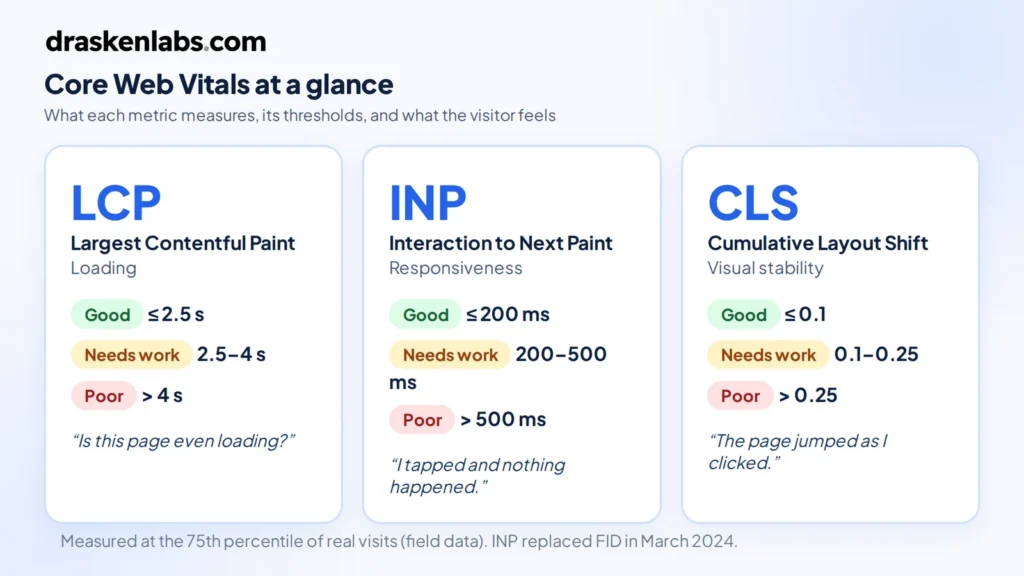
Quick answer: To pass Core Web Vitals in 2026, a page needs Largest Contentful Paint (LCP) at or under 2.5 seconds, Interaction to Next Paint (INP) at or under 200 milliseconds, and Cumulative Layout Shift (CLS) at or under 0.1, measured at the 75th percentile of real Chrome visitors over a rolling 28-day window. Mobile and desktop are assessed separately.
What are Core Web Vitals?
Core Web Vitals are three field metrics that describe how a page feels to a real person: how quickly the main content appears, how quickly the page reacts to input, and whether the layout stays still while it loads.
| Metric | What it measures | Good | Needs improvement | Poor | What the visitor experiences |
|---|---|---|---|---|---|
| LCP (Largest Contentful Paint) | Loading: when the largest visible element, usually the hero image or headline, finishes rendering | ≤ 2.5 s | 2.5–4 s | > 4 s | “Is this page even loading?” |
| INP (Interaction to Next Paint) | Responsiveness: the delay between a tap, click or keypress and the next visual update, across the whole visit | ≤ 200 ms | 200–500 ms | > 500 ms | “I tapped the button and nothing happened.” |
| CLS (Cumulative Layout Shift) | Visual stability: how much content moves unexpectedly while the page loads | ≤ 0.1 | 0.1–0.25 | > 0.25 | “I clicked the wrong thing because the page jumped.” |
INP replaced First Input Delay (FID) as the responsiveness metric in March 2024. That change matters for business sites: FID only measured the first interaction, so a site could pass while its enquiry form, menu or filter felt sluggish. INP looks at interactions across the whole visit, which is why many sites that were “green” in 2023 started failing.
The thresholds themselves have been stable since then. What changed recently is reach: LCP and INP are now measurable in all major browsers, not just Chrome, so the same numbers you see in Google’s tools can be collected from your Safari and Firefox visitors too.
Why Core Web Vitals matter for a business website
Rankings: a tiebreaker, not a shortcut
These metrics are part of Google’s page experience signals. Be realistic about their weight: relevance and content quality still decide most rankings. Where they matter is when your service page and a competitor’s are otherwise close. In local and B2B service searches, that’s common, because most pages targeting “website development company in Delhi” or “cloud consultant Dubai” say roughly the same thing.
Conversions: where the real money is
Speed and stability affect whether people act. The best-documented example is Vodafone Italy’s A/B test, published on web.dev, where improving LCP by 31% on otherwise identical landing pages produced 8% more sales. For a business website, the equivalent is enquiries, calls and booked consultations.
Paid traffic: you pay for every bounce
If you run Google or Meta ads to a landing page, every visitor who leaves before the page renders is a click you paid for and got nothing from. Slow landing pages quietly inflate your cost per lead.
Your 75th-percentile visitor is not on your laptop
Google grades you on the experience of the slower end of your real audience. For businesses selling into India, the UAE or Southeast Asia, that visitor is often on a mid-range Android phone on a mobile network. A page that feels instant on office Wi-Fi can still fail.
Field data vs lab data: the mistake most businesses make
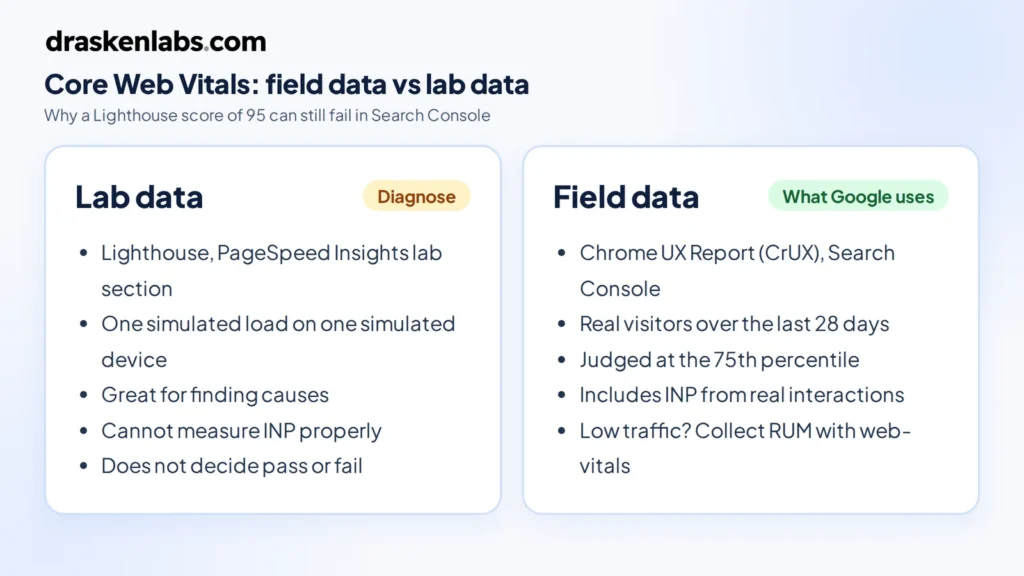
The most common conversation we have goes like this: “Our developer showed us a Lighthouse score of 95, but Search Console says our pages are failing.” Both can be true.
- Lab data (Lighthouse, the lab section of PageSpeed Insights) is a single simulated page load on a simulated device. It’s excellent for diagnosing problems and cannot tell you whether you pass.
- Field data (the Chrome User Experience Report, shown in Search Console and at the top of PageSpeed Insights) is what real visitors experienced over the last 28 days. This is what Google uses.
Lab tests also can’t measure INP properly, because INP depends on real people clicking real things. A perfect lab score with a heavy chat widget that only loads after interaction will still fail in the field.
If your site doesn’t get enough traffic to have field data in Search Console, you have two options: use lab tests as a proxy, or collect your own real-user monitoring (RUM) data with the open-source web-vitals library. If you send RUM data into your own metrics stack, tag it by page template (home, service, blog post) rather than by full URL. Per-URL labels are one of the fastest ways to blow up your observability bill with high-cardinality metrics. Setting this up properly is part of what our observability service covers.
How to check your own site in five minutes
- Open PageSpeed Insights, paste your homepage URL and run the test.
- Read the top section first, “Discover what your real users are experiencing”. That is field data. If it says “Passed” for mobile, your homepage passes; the Lighthouse score underneath is only a diagnostic.
- Switch between the Mobile and Desktop tabs. Mobile is where most business sites fail.
- Repeat for one service page and your main landing page, since those templates usually differ from the homepage.
- In Search Console, open Experience → Core Web Vitals to see which groups of URLs are failing and on which metric.
That gives you a clear, evidence-based picture of where you stand before you spend anything on fixes, and a baseline to compare against once changes go live.
What usually breaks Core Web Vitals on business websites
After auditing a lot of company sites, the causes are remarkably consistent. It’s rarely one big problem; it’s a pile of small, reasonable-sounding additions.
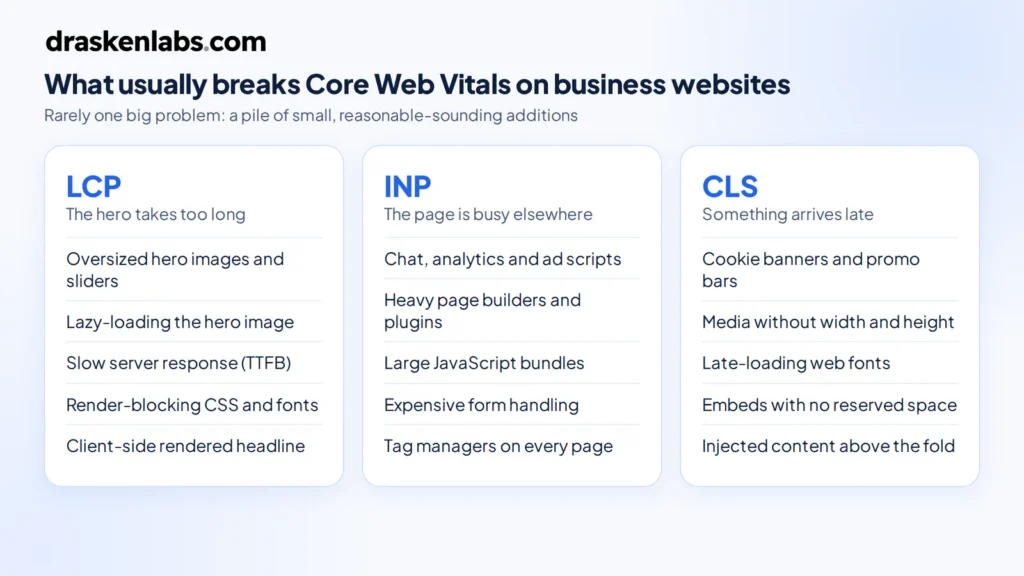
LCP problems: the hero takes too long
- Oversized hero images or sliders. A 3 MB banner exported straight from a design tool, or a five-slide carousel where every slide loads upfront.
- Lazy-loading the hero. Lazy loading is right for images below the fold and wrong for the one image that defines LCP.
- Slow server response. Shared hosting, no page caching, or a CMS that builds every page on every request pushes Time to First Byte up, and LCP can’t start until the HTML arrives.
- Render-blocking CSS and fonts. Several font families, each in multiple weights, loaded before anything can paint.
- Client-side rendering of the hero. If the headline only appears after a JavaScript bundle downloads and runs, LCP waits for all of it.
INP problems: the page is busy doing something else
- Third-party scripts. Chat widgets, analytics, ad pixels, heatmaps, A/B testing tools and tag managers all compete for the same main thread your visitor’s tap needs.
- Heavy page builders and plugin stacks. Each plugin adds its own JavaScript, often on every page whether it’s used or not.
- Large JavaScript bundles. Especially on sites that ship an entire app framework to render what is mostly static marketing content.
- Expensive form handling. Validation libraries, address autocomplete and CRM scripts that run long tasks on every keystroke.
CLS problems: something arrives late and pushes everything down
- Cookie banners and promo bars injected at the top of the page after it renders.
- Images, videos and iframes without dimensions, so the browser doesn’t know how much space to reserve.
- Web fonts swapping with very different metrics from the fallback font, reflowing every line of text.
- Embeds such as Google Maps, YouTube, review widgets and social feeds that resize themselves once loaded.
The fix order we use on business websites
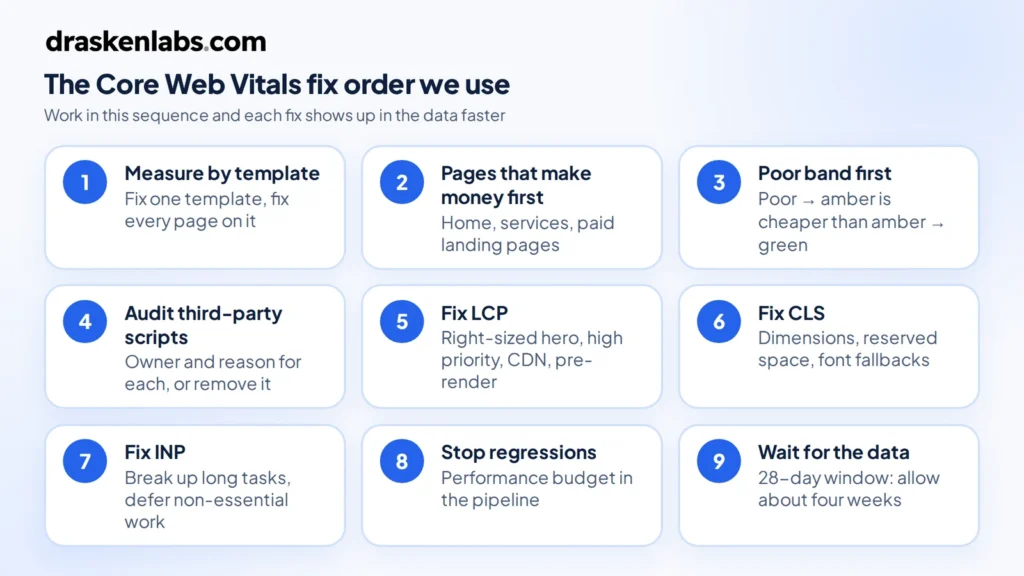
Fixing these metrics goes faster when you work in the right order. This is the sequence we follow.
- Measure by page template, not by page. Search Console groups similar URLs. Your service pages likely share one template; fix the template and you fix them all.
- Start with the pages that make money. Homepage, service pages and paid landing pages come before the blog archive.
- Fix whichever metric is in the “poor” band first. Moving a metric from poor to needs-improvement usually takes less effort than pushing an amber metric to green.
- Audit third-party scripts. Every script should have an owner and a reason. Remove the ones nobody can justify, delay the rest until after the page is interactive, and load chat widgets on intent (a click on a chat button) rather than on page load.
- Fix LCP. Serve the hero image in a modern format at the right size, don’t lazy-load it, give it high fetch priority, cache pages at the edge with a CDN, and pre-render marketing pages rather than building them per request.
- Fix CLS. Set width and height on media, reserve space for banners and embeds, and use font fallbacks with matched metrics.
- Fix INP. Break up long JavaScript tasks, defer non-essential work, and replace heavy components with lighter ones. INP is usually the hardest of the three, so budget time for it.
- Stop it regressing. Add a performance budget to your deployment pipeline so a new plugin or a 4 MB image fails the build instead of reaching production. This is standard work in our platform engineering engagements.
- Wait for the data. Field data is a 28-day rolling window. Expect to wait around four weeks before Search Console fully reflects a fix.
Hosting and platform choices that affect LCP, INP and CLS
There is no platform that passes or fails these metrics by default. We’ve seen fast WordPress sites and slow custom React sites. What matters is how the site is built and served.
- WordPress can pass comfortably with a lean theme, disciplined plugin use and full-page caching. It struggles when a heavy page builder and 30 plugins are all loading on every page.
- Headless or static setups (for example a Next.js frontend with WordPress as the CMS, which is what our own site runs on) make fast LCP easier because pages are pre-rendered, but they can still fail INP if the frontend ships too much JavaScript.
- Hosting matters mostly through server response time and caching. A CDN in front of a well-configured server fixes more LCP problems than moving to more complex infrastructure. A marketing website almost certainly doesn’t need Kubernetes, and serving static assets from a CDN is also one of the easier ways to cut cloud costs. If you want this handled end to end, see our cloud and DevOps service.
If your website includes logged-in areas such as customer dashboards or portals, INP becomes a software engineering problem rather than a website tweak. That’s the point where it helps to treat the site as an application, which we cover in our guide to custom software development services.
Questions to ask your web developer or agency
You don’t need to understand every technical detail to hold your website partner accountable. Ask these:
- Do our key templates pass all three metrics in field data, on mobile and desktop?
- Which third-party scripts load on our pages, and who decided each one was needed?
- Is the hero image lazy-loaded? What format and size is it served in?
- Are pages cached and served from a CDN?
- What stops a new plugin or image from making the site slower after launch?
- How will we know if performance regresses before Google does?
If the answers are vague, performance probably wasn’t part of the brief. That’s worth knowing when you’re comparing quotes, because performance work is one of the real differences between a cheap site and a professional one, as we explain in how much a professional business website costs in 2026.
How Drasken Labs builds for Core Web Vitals
We treat Core Web Vitals for business websites as a requirement from the start of a project, not an audit item after launch. In our website development projects that means choosing a rendering approach that suits the content, setting image and script budgets before design sign-off, reserving layout space for every component that loads late, and wiring real-user monitoring into production so we see a regression before it shows up in Search Console. You can see examples of the sites we build in our recent website work.
Is your website failing LCP, INP or CLS?
Send us the URL. We’ll tell you which metric is failing, on which templates, and what it would take to fix, whether that’s a focused performance pass or a rebuild.
Get a Core Web Vitals review from Drasken Labs →
Sources and further reading
- Web Vitals — web.dev (Google)
- Understanding Core Web Vitals and Google search results — Google Search Central
- Interaction to Next Paint (INP) — web.dev
- Vodafone: a 31% improvement in LCP increased sales by 8% — web.dev case study
- Chrome User Experience Report — Chrome for Developers
Frequently asked questions
Are Core Web Vitals a Google ranking factor?
Yes. They are part of Google’s page experience signals. Content relevance and quality still matter more, so Core Web Vitals tend to act as a tiebreaker between pages that are otherwise similar.
If my Lighthouse score is 100, do I pass Core Web Vitals?
Not necessarily. Lighthouse is a lab test on a simulated device. Google assesses Core Web Vitals using field data from real Chrome visitors. Check the Core Web Vitals report in Search Console or the field-data section of PageSpeed Insights.
How long does it take for fixes to show in Search Console?
Field data uses a rolling 28-day window, so expect roughly four weeks before a fix is fully reflected. You can use the “Validate fix” option in Search Console to start tracking it.
Why does Search Console show no Core Web Vitals data for my site?
Your pages probably don’t have enough real Chrome traffic to be included in the Chrome User Experience Report. Use lab tools for diagnosis and consider collecting your own real-user data with the web-vitals library.
Can a WordPress website pass Core Web Vitals?
Yes. WordPress sites pass regularly when they use a lightweight theme, a small set of plugins, page caching and a CDN. Heavy page builders and large plugin stacks are the usual reasons they fail.
What replaced First Input Delay (FID)?
Interaction to Next Paint (INP) replaced FID as a Core Web Vital in March 2024. INP measures responsiveness across all interactions during a visit, not just the first one.
Which Core Web Vital should I fix first?
Fix whichever metric is in the “poor” band on your most valuable page templates first. After that, LCP usually has the most direct effect on leads, and INP usually takes the most engineering effort.
Written by
Aarav Mehta
Aarav Mehta writes for the Drasken Labs blog on cloud infrastructure, Kubernetes, observability, and practical engineering decisions for growing businesses. Articles are reviewed by the Drasken Labs engineering team before publishing.